
Write and run queries
1.1 How to write a query
The FHIR Viewer accepts relative FHIR REST search queries. You enter the query path directly into the query bar, starting with a forward slash (/).
Basic example
/Patient?_count=10
This query asks the connected FHIR server to return up to 10 Patient resources.
General query structure
/{ResourceType}?{parameter1}={value1}&{parameter2}={value2}...
- ResourceType: The type of FHIR resource you are querying (for example, Patient, Specimen, Condition, Observation, DocumentReference).
- ? (question mark): Separates the resource path from the search parameters.
- Search parameters: Key–value pairs that filter, limit, or modify the search results. Multiple parameters are separated using &.
What are FHIR search parameters? Search parameters are server‑defined fields that allow you to filter and control which resources are returned. They correspond to elements defined in the FHIR specification or supported by a specific server’s configuration. Common parameter categories include:
Basic example
/Patient?_count=10
This query asks the connected FHIR server to return up to 10 Patient resources.
General query structure
/{ResourceType}?{parameter1}={value1}&{parameter2}={value2}...
- ResourceType: The type of FHIR resource you are querying (for example, Patient, Specimen, Condition, Observation, DocumentReference).
- ? (question mark): Separates the resource path from the search parameters.
- Search parameters: Key–value pairs that filter, limit, or modify the search results. Multiple parameters are separated using &.
What are FHIR search parameters? Search parameters are server‑defined fields that allow you to filter and control which resources are returned. They correspond to elements defined in the FHIR specification or supported by a specific server’s configuration. Common parameter categories include:
| Parameter category | Parameter | Description | Example query |
|---|---|---|---|
| Result controls | _count | Limits the number of results returned per page. | /Patient?_count=25 |
| _sort | Requests sorting by a supported field (serverdependent). | /Observation?_sort=-_lastUpdated | |
| Referencebased filters | subject, patient, or similar reference parameters | Returns resources linked to another resource via a reference field. | /Specimen?subject=Patient/123 Returns Specimen resources that reference Patient/123. |
| Code and identifier filters | code | Filters resources by a coded value, often from standardized vocabularies. | /Condition?code=MONDO:0005148 |
| Tagbased filters (common in research servers) | _tag | Filters resources using study or cohort tags when supported by the server. | /ResearchSubject?_tag=STUDY_ABC |
Suggested queries
Suggested queries are templates to help you get started. Selecting one fills the query bar; you can edit it before running.
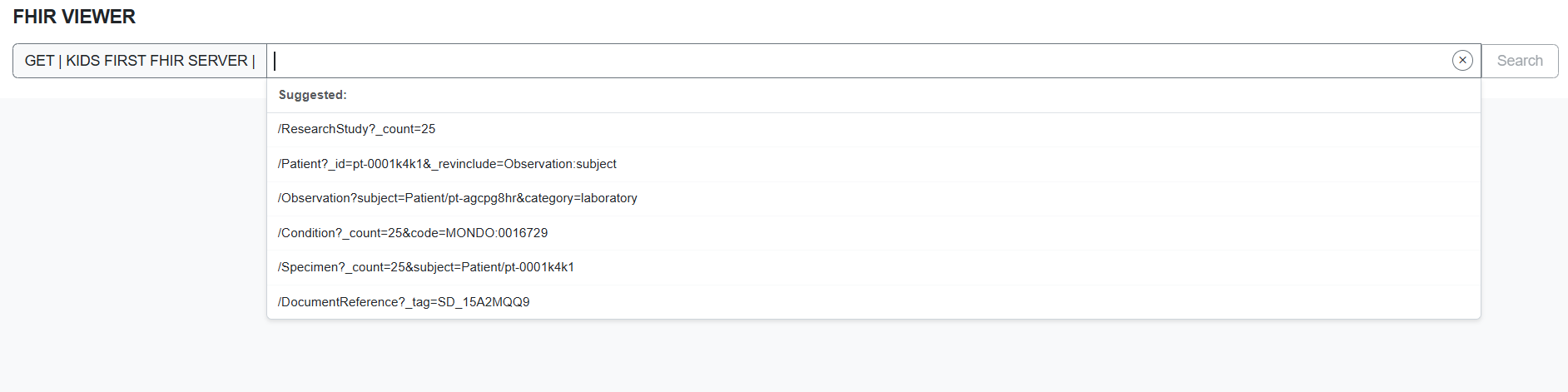
Suggested edits
- /Patient?_count=25
- /Patient?_count=25&_revinclude=Observation:subject
- /Observation?_count=25&status=final&_sort=-_lastUpdated
- /Condition?_count=25&code=MONDO:0008608
- /Specimen?_count=25&subject=Patient/pt-0001k4k1
- /DocumentReference?_count=25
1.2 Simple queries: common starting points
Enter a relative FHIR query path (starting with /). Examples:
- /Patient?_count=10
- /ResearchStudy?_count=25
- /ResearchSubject?_count=25
- /Specimen?_count=25
- /DocumentReference?_count=25
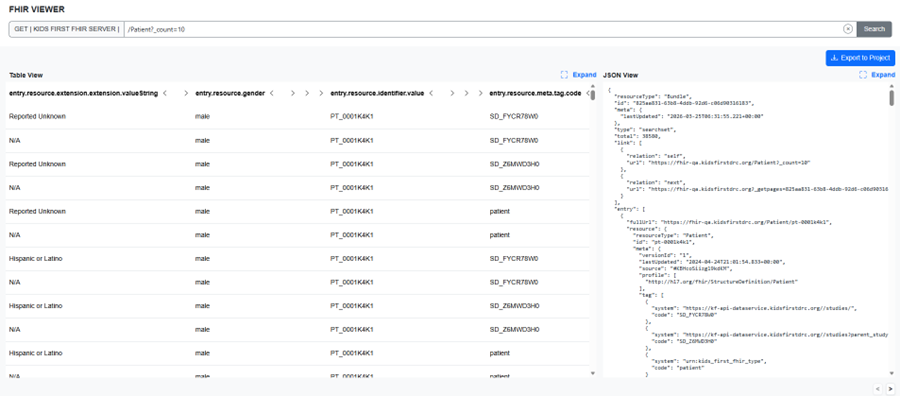
Simple query with results
Tip: Common query knobs
- _count controls page size (server may cap it).
- sort may be supported (e.g., sort=-_lastUpdated).
- Use code=, subject=, patient=, or _tag= when supported by the server.
Filtering patterns you will use often
Patient-anchored queries
Condition for a patient: /Condition?subject=Patient/<PATIENT_ID>&_count=25Specimens for a patient: /Specimen?subject=Patient/<PATIENT_ID>&_count=25DocumentReferences for a patient: /DocumentReference?subject=Patient/<PATIENT_ID>&_count=25
Study-tagged queries
ResearchSubjects for a study: /ResearchSubject?_tag=<STUDY_TAG>&_count=25Patients in a study (server-dependent): /Patient?_tag=<STUDY_TAG>&_count=25Files in a study (server-dependent): /DocumentReference?_tag=<STUDY_TAG>&_count=25
1.3 Advanced queries: include and revinclude
FHIR supports bringing related resources into the same response using include and revinclude. Support varies by server and resource. Start small and expand carefully. _include examples • / DocumentReference?_count=10&_include=DocumentReference:patient • /Specimen?_count=10&_include=Specimen:subject
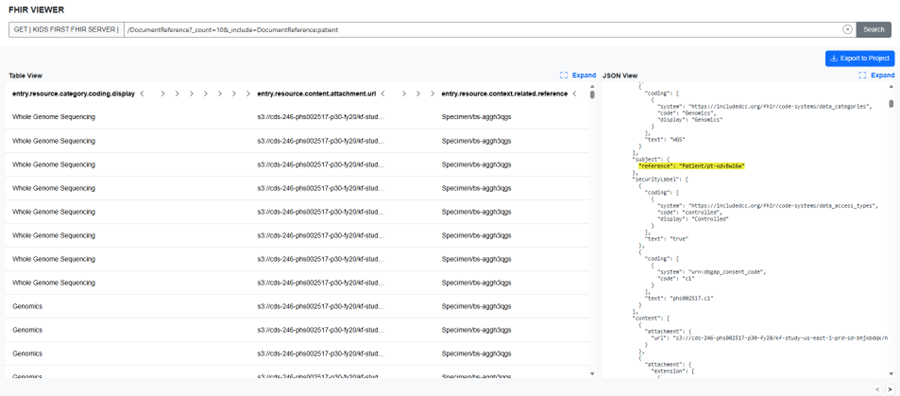
_include query with results
_revinclude examples
- /Patient?_count=10&_revinclude=Observation:subject
- /Patient?_count=10&_revinclude=Condition:subject
Tip: Performance note for include/revinclude
- These can return large payloads. Start with low _count.
- If the response is slow, narrow the base query first (e.g., by tag or specific id).
- revinclude queries often return much larger result sets than include, and many servers impose limits that may truncate or restrict responses.
1.4 Errors and OperationOutcome
Not all FHIR servers support the same search parameters or behaviors. A query that works on one server may fail or return different results on another. Invalid or unsupported parameters typically result in a server‑returned error (for example, an OperationOutcome), which is displayed directly in the viewer.

Error banner showing a server OperationOutcome
Updated 5 months ago