
Getting started
1.1 What is the FHIR Viewer?
The FHIR Viewer is a read-only interface inside CAVATICA that lets you connect to external FHIR servers (such as Kids First), run GET-based FHIR REST queries, inspect results and export results to a Project as TSV and JSON.
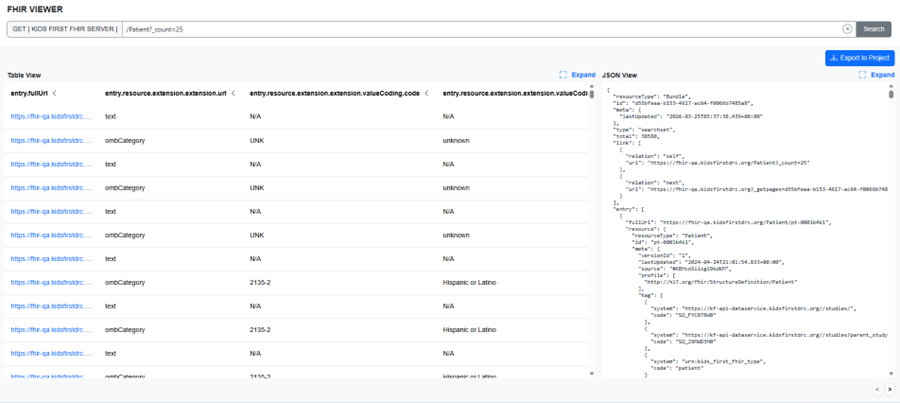
FHIR Viewer landing page
FHIR Viewer landing page
This viewer supports direct inspection of FHIR data returned from external FHIR servers. FHIR data is inherently complex and highly structured, with deeply nested JSON, coded fields, extensions, and references linking many resource types together. JSON (JavaScript Object Notation) is a lightweight, text‑based data format commonly used by APIs to represent structured data as key-value pairs and arrays, making it both machine‑readable and human‑readable, but often difficult to scan at scale.
The FHIR Viewer presents this data side by side as raw JSON and a flattened table, helping users explore, understand, and validate resource content and relationships while retaining the full fidelity of the underlying FHIR response. Users can run free‑form queries across any resource supported by the connected server to better understand how research and clinical data are represented and connected.
1.2 What is FHIR?
FHIR (Fast Healthcare Interoperability Resources, pronounced “fire”) is an HL7 standard that represents healthcare and research data as structured JSON and exposes it through REST APIs. You can think of FHIR as a set of predictable web endpoints that return JSON. Core concepts you will see
-
Resource: a single record of a specific type (e.g. Patient, Specimen, Observation).
-
Bundle: a page of search results returned by the server; results are under Bundle.entry.resource.
-
Reference: a link from one resource to another (e.g., Specimen.subject → Patient).
-
Codes: standardized vocabulary used in coded fields (e.g. HPO, SNOMED, LOINC, MONDO).
-
Extensions: additional metadata fields identified by a URL; common in research/genomics datasets.
Tip - How to read FHIR JSON quickly
-
Find resourceType to know what you’re looking at.
-
In search results, go to Bundle.entry.resource for the actual records.
-
References often look like "Patient/123" (or an object with a reference field).
-
If you see valueString / valueQuantity / valueCodeableConcept - that’s FHIR’s value[x] pattern (type varies).
1.3 FHIR standards and NCPI
The viewer is designed to work with NIH FHIR conventions, including the NCPI FHIR Implementation Guide v2 (NCPI IGv2 ). In many NIH genomics programs, a common pattern is: participant → study enrollment → specimen → phenotype → file references, represented by linked resources.
1.4 Limitations
The FHIR Viewer is continuously evolving. Information about known limitations, unsupported features, and expected behavior can be found in the Troubleshooting and support section.
Updated 5 months ago