
Export to Project
1.1 Export formats
• JSON export: saves the raw server payload (Bundle). • TSV export: saves the flattened Table view.
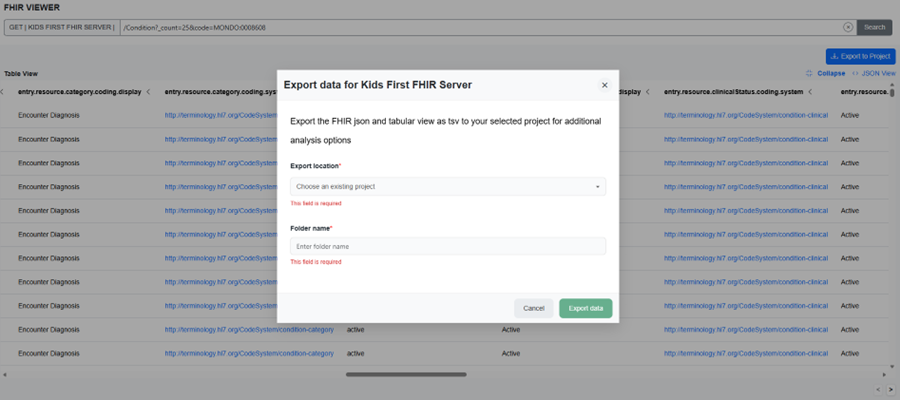
Export dialog box
1.2 How exports appear in your Project
After export, the viewer writes files into the Project and folder you choose. The exact filenames may vary by configuration, but typically include the resource type and a timestamp. • Example: Condition_20260325_072408.json • Example: Condition_20260325_072408.tsv
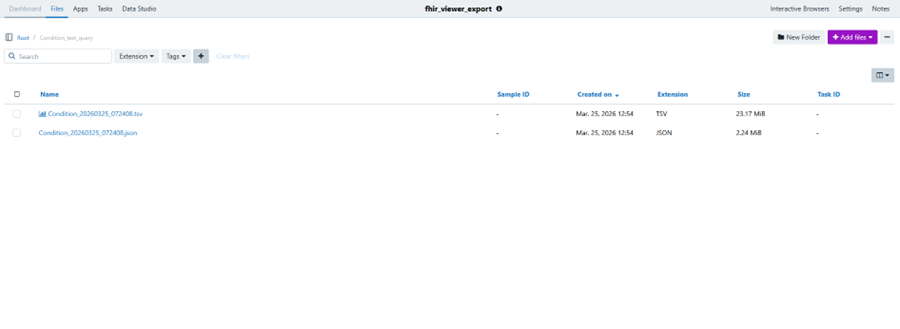
Export files in Project
1.3 How to interpret exported TSV
TSV exports are easiest to analyze when you identify the key ID columns and reference columns. • Look for an id column (resource id) and resourceType. • Reference columns often contain strings like Patient/123 or Specimen/456. • Coded fields may split into system/code/display columns (or appear as flattened JSON fragments).
Tip: Practical approach to analysis • Start by filtering rows (resource records) you care about. • Use the id as the primary key for that resource type. • Use reference columns to join across exports (e.g., Specimen.subject → Patient/id). • If you need full context for a row, open the JSON export and locate the resource by id.
1.4 How to interpret exported JSON
JSON exports preserve the full server payload, including nested fields and extensions. If you see a Bundle, the records are under entry[].resource. • Use JSON when you need nested structures or extensions that don’t flatten cleanly. • Use JSON to verify how coded fields and references are represented for a specific server.
1.5 Turning exports into a working dataset
Common ways teams make sense of exported results: • Spreadsheet-first: open TSV in Excel/Sheets, filter rows, and copy IDs for follow-up queries. • Script-first: load TSV/JSON in Python/R to join resources across multiple exports. • Hybrid: use TSV to select records, and JSON to pull nested fields/extension values for selected IDs.
1.6. Export behavior and _count
The count parameter behaves the same way during export as it does for search results: it controls how many values of the specified resource are returned per page, not the total number of values specified in the count of that query.
• For example, using _count=25 does not limit the export to 25 total values. Instead, it means 25 values per page, across all pages required to return the full result set.
• As a result, a query with a small _count value may still expand into many pages if the total number of matching resources is large.
The FHIR server enforces a limit of no more than 500 pages per export. Saving or running a generic query with a small _count value can therefore lead to export errors if the result set spans more than 500 pages.
Updated 5 months ago